SELECT
   session_id AS SPID, command AS [Command], a.text AS Query, start_time AS [Start Time],
   percent_complete AS [Percent Complete],
   dateadd(second,estimated_completion_time/1000, getdate()) AS [Estimated Completion Time]
FROM sys.dm_exec_requests r
   CROSS APPLY sys.dm_exec_sql_text(r.sql_handle) a
WHERE r.command like 'BACKUP%' OR r.command like 'RESTORE%')


Friday, May 20, 2022
T-SQL to find Backup or Restore Progress
Here is a script that comes handy while performing a huge database Backup or Restore. This script provides the details on the progress of the Backup or Restore operation including the estimated finish time.
Saturday, April 12, 2014
Unable to connect to SQL Server '(local)'. The step failed.
One fine morning you go to your office as usual and in a happy mood, you start looking into your routine tasks. Till this time everything is fine and suddenly you come across an Job failure alert which says,
The first thing you look at is, the connectivity to the server (because the message says so) and you find the server is contactable and also all the databases are up and online.
So now the question is from where the error is popping?
Open the job and its step and see what it is doing and you find every thing is fine including the syntax.
But the section "Database" is blank which is supposed to have a value.
That triggers something in your mind and a possible cause for the job failure

What next?
The database section should have a value and this is the cause for the job failure.
This usually happens if a user database is used within this section and it has been renamed or deleted.
So, the best practice is to

| Date 4/14/2014 11:47:53 PM Log Job History (SimpleJob) Step ID 1 Server SANSLAB\SQL2008R2 Job Name SimpleJob Step Name SimpleStep Duration 00:00:00 Sql Severity 0 Sql Message ID 0 Operator Emailed Operator Net sent Operator Paged Retries Attempted 0 Message Unable to connect to SQL Server 'SANSLAB\SQL2008R2'. The step failed. |
The first thing you look at is, the connectivity to the server (because the message says so) and you find the server is contactable and also all the databases are up and online.
So now the question is from where the error is popping?
Open the job and its step and see what it is doing and you find every thing is fine including the syntax.
But the section "Database" is blank which is supposed to have a value.
That triggers something in your mind and a possible cause for the job failure
What next?
The database section should have a value and this is the cause for the job failure.
This usually happens if a user database is used within this section and it has been renamed or deleted.
So, the best practice is to
- Choose a system database name for this section and use the name of user database in your syntax. It will help avoid the failures of this kind.
- Before renaming or deleting a database, make sure it is not referenced anywhere.
By doing so, even if the job fails it will give some meaningful error for us to troubleshoot further.
Monday, October 7, 2013
SQL Server Agent Could not be started (reason: Error creating new session) - Error 15247
Recently, I was working a server which is newly built and when I tried to start the SQL Server Agent, it failed saying that the Agent service could not be started on the local computer.
When I investigate more in the event viewer i found a message which says "SQL Server Agent Could not be started (reason: Error creating new session)".

When I investigate more in the event viewer i found a message which says "SQL Server Agent Could not be started (reason: Error creating new session)".
Wednesday, September 18, 2013
How to invoke a SQL job from another Job present on a different instance
For invoking an SQL Server Job from another Job which is present on a different instance, we have different ways like
- Create a Linked server and use msdb..sp_start_job to start the job
- Using xp_cmdshell
- Using SQLCMD Operating system command
Saturday, August 24, 2013
Fix - The SSIS subsystem failed to load
The subsystem failure is a common error which occurs when an SQL Server instance is migrated.
When we do the migration, we usually miss to install the SQL Server binaries on the same location as it was in source. Because of this the SQL Server jobs which uses SSIS, powershell, etc... subsystems will fail.

When we do the migration, we usually miss to install the SQL Server binaries on the same location as it was in source. Because of this the SQL Server jobs which uses SSIS, powershell, etc... subsystems will fail.
Wednesday, August 21, 2013
T-SQL Query to find last run status of scheduled Jobs
Here is a T-SQL query to find the last run status of all the scheduled jobs in SQL Server.
This query will be handy when you are not able to access the "Job Activity Monitor"
This query will be handy when you are not able to access the "Job Activity Monitor"
USE msdb
GO
SELECT DISTINCT SJ.Name AS JobName, SJ.description AS JobDescription,
SJH.run_date AS LastRunDate,
CASE SJH.run_status
WHEN 0 THEN 'Failed'
WHEN 1 THEN 'Successful'
WHEN 3 THEN 'Cancelled'
WHEN 4 THEN 'In Progress'
END AS LastRunStatus
FROM sysjobhistory SJH, sysjobs SJ
WHERE SJH.job_id = SJ.job_id and SJH.run_date =
(SELECT MAX(SJH1.run_date) FROM sysjobhistory SJH1 WHERE SJH.job_id = SJH1.job_id)
ORDER BY SJH.run_date desc
Sunday, August 18, 2013
T-SQL Query to find currently running jobs
Here is a T-SQL query to find the currently executing jobs.
The output of this query will be the list of jobs that are currently running along with the number of seconds it is been running.
The output of this query will be the list of jobs that are currently running along with the number of seconds it is been running.
SELECT  J.name as Running_Jobs,
  JA.Start_execution_date As Starting_time,
        datediff(ss, JA.Start_execution_date,getdate()) as [Has_been_running(in Sec)]
FROM msdb.dbo.sysjobactivity JAWednesday, July 10, 2013
Alert when the Scheduled job state is changed
When you create this trigger on the sysjobs table of msdb, it will send out an email alert whenever someone changes the state of the job from Enabled to Disabled or from Disabled state to Enabled.
For setting up database mail option and to use sp_send_dbmail, refer to my earlier post "Configuring Database Mail"
For setting up database mail option and to use sp_send_dbmail, refer to my earlier post "Configuring Database Mail"
USE msdb
GO
CREATE Trigger tr_AuditJobEnable
ON sysjobs
FOR UPDATE
AS
DECLARE @UserName VARCHAR(50),
@HostName VARCHAR(50),
@JobName VARCHAR(100),
@DeletedJobName VARCHAR(100),
@Ins_EnabledFlag INT,
@Del_EnabledFlag INT,
@Body VARCHAR(200),
@Subject VARCHAR(200),
@Servername VARCHAR(50)

SELECT @UserName = SYSTEM_USER, @HostName = HOST_NAME()
SELECT @Ins_EnabledFlag = Enabled FROM Inserted
SELECT @Del_EnabledFlag = Enabled FROM Deleted
SELECT @JobName = Name FROM Inserted
SELECT @Servername = @@servername

IF @Ins_EnabledFlag <> @Del_EnabledFlag
BEGIN

  IF @Ins_EnabledFlag = 1
   BEGIN
  SET @Body = 'The User "'+@username+'" from "'+@hostname+
   '" ENABLED the Job "'+@jobname+'" on '+CONVERT(VARCHAR(20),GETDATE(),100)
  SET @Subject = 'SQL Job "'+@jobname+ '" on ' + @Servername+
   ' has been ENABLED at '+CONVERT(VARCHAR(20),GETDATE(),100)
   END

  IF @Ins_EnabledFlag = 0
   BEGIN
  SET @Body = 'The User "'+@username+'" from "'+@hostname+
   '" DISABLED the Job "'+@jobname+'" on '+CONVERT(VARCHAR(20),GETDATE(),100)
  SET @Subject = 'SQL Job "'+@jobname+ '" on ' + @Servername+
   ' has been DISABLED at '+CONVERT(VARCHAR(20),GETDATE(),100)
   END

-- Send e-Mail
Exec msdb..sp_send_dbmail
       @profile_name='DBA' -- Change to your Profile
      ,@recipients='segu.sandesh@gmail.com' -- Change Recipients
      ,@Subject=@Subject
      ,@Body=@Body
END
Tuesday, June 11, 2013
Create and schedule SQL Server jobs with SSIS Packages
In my previous post, we have seen how to use SQL Server Import and export wizard to import or export data and save the package.
When you save the package that is generated using this wizard, it is actually an SSIS package.
You can also use Visual Studio to create complex SSIS packages which performs the data extraction, transformation, maintenance of database, cleanup, etc...
When you save the package that is generated using this wizard, it is actually an SSIS package.
You can also use Visual Studio to create complex SSIS packages which performs the data extraction, transformation, maintenance of database, cleanup, etc...
Saturday, May 18, 2013
Monitor SQL Server and related services using T-SQL
As part of the DBA job, it is very important to monitor the SQL Server and its related service and ensure that the services are always up and running.
There are different ways to achieve this, and one among them is by using the custom SQL scripts.
Writing custom SQL scripts play a vital role in few environments where budget is a concern to implement an full fledged monitoring system.
There are different ways to achieve this, and one among them is by using the custom SQL scripts.
Writing custom SQL scripts play a vital role in few environments where budget is a concern to implement an full fledged monitoring system.
Wednesday, January 2, 2013
SQL Agent Tokens
Consider a situation where in one needs to have SQL Jobs to be more independent of machine/instance and/or the main job itself. In such cases we can utilize one of the features of SQL Server called "TOKENS".
When a Job step is written using tokens it gives the same flexibility that "Variables" provide in software programs. I hope that makes sense! Many of us do understand the meaning and usage of Variables... so will not explain the same.
When a token is used in a job step script, SQL Server Agent replaces the token at run time, before the job step is executed by the Transact-SQL subsystem.
Note: I have tried to explain the usage of tokens by making use of the following example.
For example: Consider a situation wherein we are saving the output logs of a Job from multiple servers (Development, Testing, and Production) to one central location. In such cases, we have two options of specifying the output path.
1. Manually setting the path for job on each of the Servers.
2. Or making use of "TOKENS" which makes our life easier.
Let’s make use of the tokens.
This centralization of output log location allows the use of common scripts for all environments.
Servername can be replaced by using SQL Server Agent Token [MACH], [DATE] and configure output to a common location shown below.
\abcd\Prod\SQLServersJobs\LOGS\
The server name differentiates the environment context of the log.
Note: The token templates used are different for SQL versions.
<Template>
SQL2000
[MACH]\[INST]_<jobname>_Step1_[DATE].log -- Where <jobname> is the name of the job.
Example: SQL2000
\abcd\Prod\SQLServersJobs\LOGS\[MACH]_[INST]\MyJob_Step1_[DATE].log
The above would be converted to: (see that default instance returns as MSSQLSERVER)
\abcd\Prod\SQLServersJobs\LOGS\A2MDEV101_MSSQLSERVER\MyJob_Step1_20091005.log
SQL2005
$(ESCAPE_NONE(MACH))\$(ESCAPE_NONE(INST))_<jobname>_Step1_$(ESCAPE_NONE(DATE)).log --Where <jobname> is the name of the job.
Example: SQL2005 (SP1 & higher) & SQL2008
\abcd\Prod\SQLServersJobs\LOGS\$(ESCAPE_NONE(MACH))_$(ESCAPE_NONE(INST))\MyJob_Step1_$(ESCAPE_NONE(DATE)).log
The above would be converted to: (see that default instance returns as MSSQLSERVER)
\abcd\Prod\SQLServersJobs\LOGS\A2MPRD151_LOGGING\MyJob_Step1_20091005.log
And that is all for now.
For more on tokens one can refer to the following web link:
http://msdn.microsoft.com/en-us/library/ms175575.aspx
When a Job step is written using tokens it gives the same flexibility that "Variables" provide in software programs. I hope that makes sense! Many of us do understand the meaning and usage of Variables... so will not explain the same.
When a token is used in a job step script, SQL Server Agent replaces the token at run time, before the job step is executed by the Transact-SQL subsystem.
Note: I have tried to explain the usage of tokens by making use of the following example.
For example: Consider a situation wherein we are saving the output logs of a Job from multiple servers (Development, Testing, and Production) to one central location. In such cases, we have two options of specifying the output path.
1. Manually setting the path for job on each of the Servers.
2. Or making use of "TOKENS" which makes our life easier.
Let’s make use of the tokens.
This centralization of output log location allows the use of common scripts for all environments.
Servername can be replaced by using SQL Server Agent Token [MACH], [DATE] and configure output to a common location shown below.
\abcd\Prod\SQLServersJobs\LOGS\
The server name differentiates the environment context of the log.
Note: The token templates used are different for SQL versions.
<Template>
SQL2000
[MACH]\[INST]_<jobname>_Step1_[DATE].log -- Where <jobname> is the name of the job.
Example: SQL2000
\abcd\Prod\SQLServersJobs\LOGS\[MACH]_[INST]\MyJob_Step1_[DATE].log
The above would be converted to: (see that default instance returns as MSSQLSERVER)
\abcd\Prod\SQLServersJobs\LOGS\A2MDEV101_MSSQLSERVER\MyJob_Step1_20091005.log
SQL2005
$(ESCAPE_NONE(MACH))\$(ESCAPE_NONE(INST))_<jobname>_Step1_$(ESCAPE_NONE(DATE)).log --Where <jobname> is the name of the job.
Example: SQL2005 (SP1 & higher) & SQL2008
\abcd\Prod\SQLServersJobs\LOGS\$(ESCAPE_NONE(MACH))_$(ESCAPE_NONE(INST))\MyJob_Step1_$(ESCAPE_NONE(DATE)).log
The above would be converted to: (see that default instance returns as MSSQLSERVER)
\abcd\Prod\SQLServersJobs\LOGS\A2MPRD151_LOGGING\MyJob_Step1_20091005.log
And that is all for now.
For more on tokens one can refer to the following web link:
http://msdn.microsoft.com/en-us/library/ms175575.aspx
Thursday, June 7, 2012
Error while starting SQL Server Agent in Denali (OpenSQLServerInstanceRegKey:GetRegKeyAccessMask failed (reason: 2).)
I had recently installed SQL Server 2012 AKA Denali CTP version on my system and when I tried to start the SQL Server agent, The agent was starting and was immediately getting stopped by displaying the below message.

When I investigated further, I found the below error message from the event viewer.
When I investigated further, I found the below error message from the event viewer.
OpenSQLServerInstanceRegKey:GetRegKeyAccessMask failed (reason: 2).
|
Possible Workaround:
I got this working by changing the Log on account of SQL server agent from "NT SERVICE\SQLServerAgent" to "Local System" or a domain account.
Wednesday, June 6, 2012
Recycle error log and SQL Server agent error log (SQLAgent.out) file
Recycle Error log:
When we run the below command, it Closes the current error log file and cycles the error log extension numbers just like a server restart.
Permission Required: sysadmin fixed server role
Recycle SQL Server Agent error log (SQLAgent.out):
When we run the below command, it Closes the current SQL Server Agent error log file and cycles the SQL Server Agent error log extension numbers just like a server restart.
Permission Required: sysadmin fixed server role
When we run the below command, it Closes the current error log file and cycles the error log extension numbers just like a server restart.
Permission Required: sysadmin fixed server role
USE msdb
GO
EXEC sp_cycle_errorlog
GO
Recycle SQL Server Agent error log (SQLAgent.out):
When we run the below command, it Closes the current SQL Server Agent error log file and cycles the SQL Server Agent error log extension numbers just like a server restart.
Permission Required: sysadmin fixed server role
USE msdb
GO
EXEC dbo.sp_cycle_agent_errorlog
GO
Tuesday, February 7, 2012
Moving SQL Agent Log file "SQLAGENT.OUT" to a different location
In one of my previous posts "Undocumented stored procedure for retrieving SQL Agent properties", I had explained how to retrieve the SQL Agent Properties.
In this post I will explain how to change the location of the SQL Agent Log file "SQLAGENT.OUT".
To find the current location of SQLAGENT.OUT file, execute the below SP and look at the value of the column "errorlog_file". This is location where SQLAGENT.OUT file is located.
EXEC msdb..sp_get_sqlagent_properties
GO
Output:

Now, to change the location of SQLAGENT.OUT file, run the below command and re-start the SQL Server Agent Service and you are done.
EXEC msdb.dbo.sp_set_sqlagent_properties @errorlog_file=N'<new path>\SQLAGENT.OUT'
GO
Wednesday, June 1, 2011
Unable to start mail session (reason: No mail profile defined) - Message in Error Log
There will be many different messages that will be logged in the Error Log of SQL Server. Among them you might also find the below message some times.
This is the most common message that will be logged when there is no "Mail Session" defined for the SQL Server Agent Alert System.
| Date 6/1/2011 8:18:27 AM Log SQL Server Agent (Archive #2 - 6/1/2011 8:18:00 AM) Message [098] SQLServerAgent terminated (normally) |
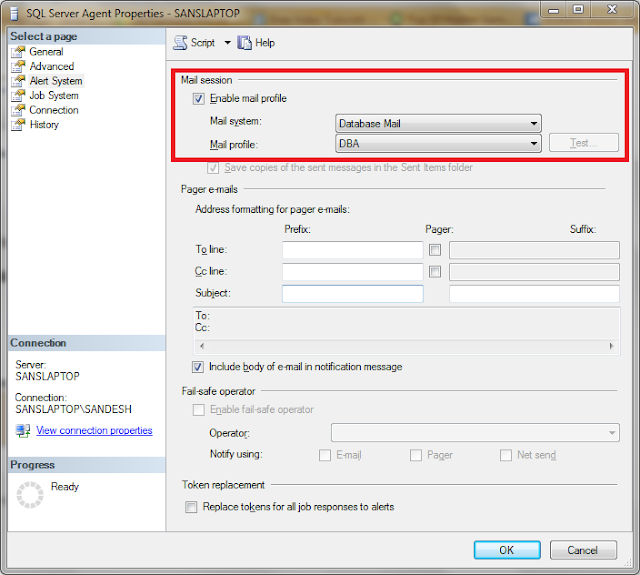
To Fix this or to make this message disappear in the Error Log, you have to enable "Mail Session" and re-start the SQL Server Agent.
To Do this,
- Connect to the Server
- Right Click on the "SQL Server Agent" and go to "Properties"
- Then Go to "Alert System" Tab
- Make sure the check box "Enable Mail Profile" is checked
- Click OK to exit
- Re-start the SQL Server Agent Service
Now if you again look into the Error Log you will not find this message anymore after re-starting the Agent Service.
Subscribe to:
Posts (Atom)