SansSQL: Cloud

Friday, May 19, 2023

Design Principles for Building Powerful Cloud-Native Applications

In recent years, cloud-native applications have become increasingly popular due to their scalability, resiliency, and agility. Cloud-native applications are designed to run on cloud platforms and leverage the capabilities of the cloud to achieve their goals. To develop effective cloud-native applications, it is essential to follow a set of design principles that ensure the application is scalable, fault-tolerant, and easy to maintain. In this article, we will discuss some of the key design principles for cloud-native applications.
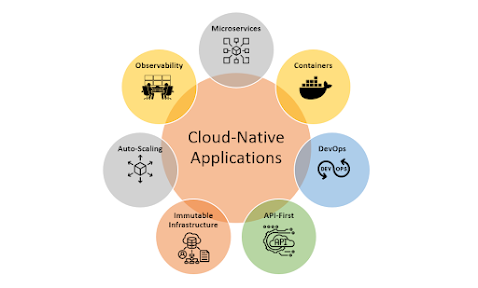
  1. Microservices Architecture: The microservices architecture is a design pattern that structures an application as a collection of small, independent services. Each service performs a specific function and communicates with other services using lightweight protocols such as REST. This architecture is ideal for cloud-native applications as it allows each service to scale independently, making the application more resilient and fault-tolerant.

  2. Containers: Containers are lightweight and portable units of software that can run anywhere, making them ideal for cloud-native applications. Containers enable applications to run consistently across different environments, making them easier to deploy and manage. Docker is the most popular containerization technology used in cloud-native applications.

  3. DevOps: DevOps is a set of practices that combines software development and operations to streamline the software delivery process. In cloud-native applications, DevOps is critical as it enables continuous delivery and deployment of software updates. DevOps practices such as automation, continuous integration, and continuous delivery make it easier to deploy and maintain cloud-native applications.

  4. API-First Design: API-first design is a development approach that prioritizes the design and implementation of APIs before building the user interface. This approach ensures that the application's backend is designed to be flexible, scalable, and interoperable, making it easier to integrate with other systems. APIs enable different services to communicate with each other, making the application more modular and flexible.

  5. Immutable Infrastructure: Immutable infrastructure is an approach to infrastructure management that treats infrastructure as code. With this approach, infrastructure changes are made by creating a new version of the infrastructure instead of updating the existing infrastructure. This approach ensures that the infrastructure is consistent, reliable, and can be easily reproduced in case of failure.

  6. Auto-Scaling: Auto-scaling is a feature that enables cloud-native applications to adjust resource usage automatically based on demand. Auto-scaling ensures that the application can handle fluctuations in traffic and workload, making it more resilient and fault-tolerant. Cloud platforms such as Microsoft Azure, Amazon Web Services (AWS) and Google Cloud Platform (GCP) offer auto-scaling features that can be easily integrated into cloud-native applications.

  7. Observability: Observability is the ability to understand the internal state of an application using data collected from its external behaviour. Observability is critical in cloud-native applications as it enables developers to monitor the application's health, detect issues, and troubleshoot problems quickly. Tools such as Prometheus and Grafana can be used to monitor and analyse application metrics in real-time.

In conclusion, designing cloud-native applications requires a different approach than traditional software development. By following the design principles outlined above, developers can create cloud-native applications that are scalable, resilient, and easy to maintain. Microservices architecture, containers, DevOps, API-first design, immutable infrastructure, auto-scaling, and observability are all essential components of a well-designed cloud-native application. By adopting these principles, developers can build applications that take full advantage of the cloud's capabilities and deliver value to their users.

Saturday, March 18, 2023

6 Cloud Design Principles for a Successful Cloud Environment

As more businesses adopt cloud technology, it’s essential to follow best practices for cloud design to ensure the efficient and effective use of cloud resources. Cloud design principles can help you create a cloud environment that meets your business needs while ensuring reliability, scalability, and security. In this article, we will discuss some of the key cloud design principles.

Scalability

Scalability is a crucial factor in cloud design. The ability to scale resources up or down according to demand is one of the key advantages of cloud computing. Cloud design should ensure that resources can be easily scaled up or down as required without disrupting the service. This requires a design that allows for elastic scaling, which means that resources can be added or removed on-demand without affecting the overall performance of the application.

Resiliency

Resiliency is the ability of a system to withstand and recover from failures. In cloud design, resiliency is achieved by implementing redundancy across multiple availability zones (AZs) and regions. The use of load balancers and auto-scaling groups can help ensure that resources are distributed across multiple AZs, reducing the impact of a failure in a single AZ.

Security

Security is a critical consideration in cloud design. It’s important to ensure that sensitive data is protected against unauthorized access or disclosure. This can be achieved by using encryption to secure data at rest and in transit, implementing access controls to restrict access to sensitive data, and monitoring the environment for security threats.

Performance

Performance is a key factor in cloud design, and it’s important to ensure that the application can handle the expected workload. Cloud design should focus on optimizing the performance of the application by using appropriate instance types, storage options, and network configurations. This requires a deep understanding of the application architecture and the workload patterns.

Cost Optimization

Cloud design should also focus on cost optimization. Cloud resources can be expensive, and it’s important to design the environment in a way that optimizes costs without sacrificing performance or reliability. This can be achieved by using reserved instances, implementing auto-scaling policies, and monitoring resource utilization to identify cost-saving opportunities.

Automation

Automation is a crucial factor in cloud design. Manual processes can be time-consuming and error-prone, and can lead to inconsistency and inefficiency. Cloud design should focus on automating as many tasks as possible, including deployment, scaling, and monitoring. This requires a deep understanding of the tools and services available in the cloud environment.

In conclusion, cloud design principles are essential for creating a cloud environment that meets business needs while ensuring reliability, scalability, security, performance, cost optimization, and automation. By following these principles, organizations can create a cloud environment that is efficient, effective, and easy to manage, providing a solid foundation for growth and innovation.


Monday, March 6, 2023

7Rs of Cloud Migration Strategies

Cloud migration is the process of moving data, applications, and other resources from an on-premises infrastructure to a cloud-based environment. It has become increasingly popular in recent years, as organizations seek to take advantage of the scalability, flexibility, and cost savings offered by cloud computing. However, cloud migration can be a complex and challenging process, and organizations need to carefully consider their options when planning a migration project. The 7Rs of cloud migration strategies provide a useful framework for organizations to follow when planning a migration project. In this article, we will take a closer look at the 7Rs of cloud migration strategies and how they can be used to achieve a successful migration.

  1. Rehost

Rehosting, also known as "lift and shift," involves moving an application or workload from an on-premises environment to the cloud without making any significant changes. This approach is often used when an organization needs to move quickly and does not have the time or resources to make significant changes. The main advantage of rehosting is that it is relatively quick and easy and can be a good way to get started with a cloud migration project. However, it may not be the best option in the long term, as it does not take full advantage of the benefits of cloud computing.

  1. Refactor

Refactoring involves making some changes to an application or workload before moving it to the cloud. This might involve re-architecting the application, optimizing its performance, or making other changes to take advantage of the features of the cloud environment. Refactoring can be more time-consuming than rehosting, but it can also result in significant cost savings and performance improvements.

  1. Revise

Revising involves making significant changes to an application or workload before moving it to the cloud. This might involve rewriting parts of the code, changing the database schema, or making other significant changes. Revising can be a good option if an organization is looking to modernize an application or workload or if it is not well-suited to the cloud environment.

  1. Rebuild

Rebuilding involves completely rewriting an application or workload for the cloud environment. This can be a time-consuming and expensive process, but it can also result in significant improvements in performance, scalability, and other areas. Rebuilding can be a good option if an organization is looking to take full advantage of the features of the cloud environment.

  1. Replace

Replacing involves replacing an existing application or workload with a new application or workload that is better suited to the cloud environment. This can be a good option if the existing application or workload is outdated or not well-suited to the cloud environment. However, it can also be a time-consuming and expensive process, and it may not always be possible to find a suitable replacement.

  1. Retain

Retaining involves keeping an application or workload in its existing environment and not migrating it to the cloud. This can be a good option if the existing environment is meeting the organization's needs and there is no need to migrate. However, it may also result in missed opportunities to take advantage of the benefits of cloud computing.

  1. Retire

Retiring involves decommissioning an application or workload that is no longer needed. This can be a good option if an application or workload is no longer in use or if it is outdated and no longer meets the organization's needs. Retiring can help reduce costs and simplify an organization's IT environment.

In conclusion, the 7Rs of cloud migration strategies provide a useful framework for organizations to follow when planning a cloud migration project. By carefully considering each option and choosing the approach that best suits their needs, organizations can achieve a successful cloud migration that meets their business requirements and takes full advantage of the benefits of cloud computing.

Migration Strategy decision criteria should be based on both Business and Technical needs.

The level of effort required in migrating increase bottom up as described in the image below.


Thursday, February 20, 2020

Disable Auto-Forwarding of e-Mails to external domain in Office 365

e-Mails are one of the most critical components and infrastructure of any business in the current day and age. e-Mails can bring in business as well as loss if misused. A lot of data theft can happens via e-Mails and it becomes most important to safegaurd the e-Mail infrastructure.
If a hacker gains access to a user's mailbox, they can auto-forward the user's email to an outside address and steal proprietary information.
One such step in safegaurding the data that leaks via emails is to disable the Auto-Forwarding of e-Mails to external domains.

To Disable Auto-Forwarding of e-Mails to External Domains in Office 365, Create a Transport Rule as below

  • From the Microsoft 365 admin center, Select Exchange --> Mail Flow --> Select the Rules tab --> Click on the plus sign and Choose "Create a new rule"
  • Name your new rule and Select More options
  • Click on the drop-down for "Apply this rule if", Select the "Recipient", and then "is external/internal"
  • Select "Outside the organization" and click OK
  • Click "add condition" and Click on the drop-down, Select "The message properties", then select "include the message type"
  • Open the select message type drop-down, choose "Auto-forward" and click OK.
  • Open the "Do the following" drop-down, select "Block the message", then choose "reject the message and include an explanation"
  • Enter the message text for your explanation that you want to show to your users, then select OK.
  • Scroll to the bottom and select Save
This newly created Transport Rule will now start blocking the Auto-Forwarding of e-Mails to external domains.

Tuesday, April 9, 2019

Best Security Practice In An Era of 5G and Cloud Platforms - A guest Post by Ralf Llanasas

Greater potential brings greater security responsibilities

The real world application of 5G is bound to trigger security issues that might not be evident in labs and test beds. As 5G promises customers, businesses, and service providers unparalleled potentials, so too does it hold unparalleled security lapses that will give way to cyber-attacks.

5G will envelop a vast array of technology platforms, from mobile devices to WiFi, Bluetooth, IoT infrastructures, etc., and security provisions need to cater to all of these. The technology’s low to zero latency also improves cloud performance, driving more industries, devices, and applications to become even more cloud dependent, if not completely.

An increasing number of functionalities across various industries are migrating to the cloud
More applications, more loopholes

A number of studies have recently raised red flags over 5G security gaps yet to be resolved. One such is the UK Government’s 5G Testbeds and Trials program conducted in collaboration with the University of Surrey’s 5G Innovation Center and three ongoing testbed programs -- AutoAir, 5G RuralFirst, and Worchestershire 5G.

Peter Claydon, project director of AutoAir, states that, “Since the age of 2G, mobile networks have been some of the most secure things on the planet, helped by the fact that each one is controlled by a single network operator.” He points out that this is different with 5G because the technology “opens up mobile networks allowing network operators to provide ‘slices’ of their networks to customers.” The result of such a scenario is therefore more open entry points for attacks.

In another similar study conducted by a team of researchers from the Technical University in Berlin, ETH Zurich, and SINTEF Digital Norway, it was found that 5G opens up glaring security lapses in Authentication and Key Agreement (AKA). AKA provides a security protocol used by phones to securely communicate with mobile networks. These security lapses in AKA over the 5G airwaves can allow cybercriminals to intercept calls and text messages on phones, as well as steal other sensitive data.

These studies, along with many others, have led to insights on the best security practices in an era of 5G and cloud computing. Before determining solutions, however, its best to zero in on what exactly the key challenges of 5G are.

Key security challenges

5G introduces a fundamental change in the relationship between networks, human machine interface, and end users. The key security challenges that attend such a reconfiguration include:
  • Exposure of critical facilities: With IoT networks woven through facilities such as power grids, elevators, door locks, water systems, autonomous vehicles, etc., 5G exposes our critical infrastructures to unprecedented risks.
  • Workload migration: Migration of workloads to 5G edge-computing exposes businesses to the combined risks of endpoint computing and cloud computing, given that the businesses need to monitor thousands of computing nodes in the process.
  • Hybrid computing eroding perimeters: With 5G, the idea of the perimeter as IT professionals know it, has been turned on its head. On 5G, different wireless networks will converge, and several aspects of business processes, health care, and the everyday lives of individuals will be locked into a system of hybrid computing where massive amounts of data are harvested to monitor and optimize odds and ends functionality.

Best Security Practices for the New Industrial Era


Some key target areas for security solutions
5G applications

The best way to address these security challenges is through unrelenting efforts from the onset, rather than waiting until these issues snowball into serious problems. With the lessons learned from the implementation of previous generations of wireless networks, businesses can put adequate preemptive measures in place to tackle these challenges. 

The difference, though, lies in what’s going to be increasing reliance on cloud platforms and 5G’s ‘slices’ of networks phenomenon. These expose loopholes, but they can be plugged to some extent with the right security practices.

The following is a rundown of some best practices for the new industrial era, where cloud platforms have become so significant:
  • Threat intelligence upgrades: This can serve both in risk mitigation and damage control. It can help prevent new attacks from recurring, and can also help prepare for threats as they evolve. It entails leveraging on Machine Learning and AI, and replacing traditional security architectures with more advanced security products.
  • Segmenting networks: Businesses can mitigate the cyber security risks which their critical resources are exposed to by using effective strategies to segment devices, apps, workflow and transactions.
  • Deploying compatible solutions: Putting together only solutions that are compatible with each other not only helps avoid further complications down the line, but also allows for the collection of data that can easily be used to identify and address risks across various parts of an organization.
  • Reinforcing access control: With more people and devices accessing 5G airwaves, businesses need to deploy a zero-trust principle where every single request for network access is thoroughly validated and authenticated.
  • Deploying MSSPs: Managed Security Service Providers (MSSP) give businesses a highly efficient and cost-effective option for outsourcing their 5G security responsibilities.
Final Words
5G and cloud computing is set to generate a new wave of innovation, taking productivity to new dimensions across various industries. The low to zero latency of the fifth generation mobile network technology enables a wide range of devices to stand alone, where previous networks caused them to remain tethered to other devices. This standalone capability is a result of cloud platforms, as most applications will be cloud dependent. 

However, this also takes cyber security threats to new heights, and businesses need to embrace the prospects of 5G with cautious optimism. By implementing the best security practices outlined above, businesses can position themselves to reap the tremendous benefits of 5G without exposing their assets to a slew of cyber threats.

About Ralf Llanasas
Ralf is a technology blogger, he writes about the latest mobile phones and technology news. He currently works at Whatphone.com.au as a content manager and his writings can be seen on various technology blogs. He also loves taking pictures when free.

Friday, June 15, 2018

Turn on fraud alerts in O365 MFA - An Additional security step

Multi-Factor Authentication (MFA) is a great feature for securing access to Enterprise applications but when a user receives a multi-factor authentication request when they aren’t expecting it, what they do? They can ignore the call or answer and hang up without pressing # to deny access to the person attempting to use their credentials.

This new feature "Fraud Alert" adds more value to the security by taking it to the next step by allowing the user to be more proactive about attempted attacks. They can answer the phone and enter their configured fraud alert code to report the attempted access. Not only it will deny the authentication taking place, but will block the user’s account so that additional authentication attempts are automatically denied without continuing to bother the user. It can also send an email notification to any configured email addresses so that they can take action, investigate, and change the user’s password. Once they have taken appropriate action, they can unblock the user’s account in the MFA Management Portal.

Turn on fraud alerts

  • Sign in to the Azure portal as an administrator.
  • Browse to Azure Active Directory > MFA Server > Fraud alert
  • Set the Allow users to submit fraud alerts setting to On
  • Select Save

Configuration options

Block user when fraud is reported: If a user reports fraud, their account is blocked for 90 days or until an administrator unblocks their account. An administrator can review sign-ins by using the sign-in report, and take appropriate action to prevent future fraud. An administrator can then unblock the user's account.

Code to report fraud during initial greeting: When users receive a phone call to perform two-step verification, they normally press # to confirm their sign-in. To report fraud, the user enters a code before pressing #. This code is 0 by default, but you can customize it

Note: The default voice greetings from Microsoft instruct users to press 0# to submit a fraud alert. If you want to use a code other than 0, record and upload your own custom voice greetings with appropriate instructions for your users.

View fraud reports
  • Sign in to the Azure portal
  • Select Azure Active Directory > Sign-ins. The fraud report is now part of the standard Azure AD Sign-ins report

Wednesday, May 16, 2018

Cloud Access Security Broker (CASB)

Cloud computing has matured way too much in the recent years and with its truly innovative, increased speed to collaborate, communicate, and ease of use is becoming the integral part of the business. However, with the increased use of cloud computing, the data that should have resided within the organizations perimeter is now being moved beyond the walls of the organization. And In this era of Cloud and BYOD, CYOD, COPE, it is much easier to make the data available anytime and anywhere at the same time maintaining an efficient security posture is becoming a big challenge.
Security is at the top of every organizations list and is a shared responsibility between the service provider and the customer. Even though the cloud service provider provides an optimum level of security for the applications hosted on their platform, it is difficult for them to gain deeper visibility and control at the risks associated with user behavior. Also, the visibility of access from outside of an organizations network or with a personal device is limited and lays path for the relook at the security in the cloud in a different way.

Cloud Access Security Brokers are a category of security tools that help enterprises safely enable cloud apps and mobile devices.  A Cloud access security brokers (CASBs) are on-premises, or cloud-based security policy enforcement points, placed between cloud service consumers and cloud service providers to combine and interject enterprise security policies as the cloud-based resources are being accessed. CASBs consolidate multiple types of security policy enforcement. Example security policies include authentication, single sign-on, authorization, credential mapping, device profiling, encryption, tokenization, logging, alerting, malware detection/prevention and so on.

CASBs work by intermediating traffic between cloud apps and users. Once proxied, these tools provide:
  • Visibility—audit logs, security alerts, compliance reports, etc.
  • Data Security—access control, data leakage prevention, encryption, etc.

Together, these functions fill in the gaps otherwise encountered when an enterprise moves from internal, premises-based applications to cloud. For enterprises in heavily regulated industries, like Finance and Healthcare, use of a CASB might be the only practical approach to enabling cloud apps. More broadly, any organization with sensitive data to protect would be well served by considering this emerging solution category.


The Four Pillars of CASB are 
  • Visibility
  • Compliance
  • Data Security 
  • Threat Protection

By using cloud access security brokers, organizations can:
  • Identify what Shadow IT cloud services are in use, by whom, and what risks they pose to the organization and its data
  • Evaluate and select cloud services that meet security and compliance requirements using a database of cloud services and their security controls
  • Protect enterprise data in the cloud by preventing certain types of sensitive data from being uploaded, and encrypting and tokenizing data
  • Identify potential misuse of cloud services, including both activity from insiders as well as third parties that compromise user accounts
  • Enforce differing levels of data access and cloud service functionality based on the user’s device, location, and operating system

Choosing a CASB is not an easy task. While many providers focus on limited areas of the four CASB functionality pillars, most organizations prefer to select a single provider that covers all use cases. Skyhigh Networks, Symantec and Netskope are some of the leaders in CASB while CipherCloud and Cisco are challengers according to the Gartner’s Magic Quadrant for Cloud Access Security Brokers.

Monday, May 14, 2018

How to add an additional Administrator to your Amazon AWS account


To create an additional administrator in your AWS account, follow the below steps
  1. Login to your AWS Management Console
    https://console.aws.amazon.com/ 
  2. Search for the "IAM" service
  3. In the left navigation panel, select "Users".
  4. Choose "Add User"
  5. Provide the User Name, Access type, and Password
  6. Choose the option "Attach Existing Policies Directly" and select "Administrator Access"
  7. Review the Settings in the next screen
  8. On choosing the option "Create User" this will now create a new user with the administrator rights
  9. On successful creation of the user, the portal allows you to down the credentials and share to the user via the send email link. 
  10. Optionally, you can customize the sign in URL before sending the details, by navigating to the IAM dashboard and selecting the option Customize under "IAM Users Sign-In Link"
    https://console.aws.amazon.com/iam/home

Ads