SansSQL: Azure

Friday, May 19, 2023

Design Principles for Building Powerful Cloud-Native Applications

In recent years, cloud-native applications have become increasingly popular due to their scalability, resiliency, and agility. Cloud-native applications are designed to run on cloud platforms and leverage the capabilities of the cloud to achieve their goals. To develop effective cloud-native applications, it is essential to follow a set of design principles that ensure the application is scalable, fault-tolerant, and easy to maintain. In this article, we will discuss some of the key design principles for cloud-native applications.
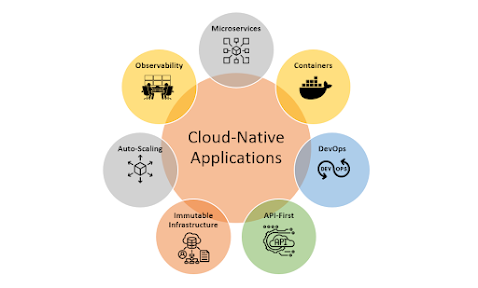
  1. Microservices Architecture: The microservices architecture is a design pattern that structures an application as a collection of small, independent services. Each service performs a specific function and communicates with other services using lightweight protocols such as REST. This architecture is ideal for cloud-native applications as it allows each service to scale independently, making the application more resilient and fault-tolerant.

  2. Containers: Containers are lightweight and portable units of software that can run anywhere, making them ideal for cloud-native applications. Containers enable applications to run consistently across different environments, making them easier to deploy and manage. Docker is the most popular containerization technology used in cloud-native applications.

  3. DevOps: DevOps is a set of practices that combines software development and operations to streamline the software delivery process. In cloud-native applications, DevOps is critical as it enables continuous delivery and deployment of software updates. DevOps practices such as automation, continuous integration, and continuous delivery make it easier to deploy and maintain cloud-native applications.

  4. API-First Design: API-first design is a development approach that prioritizes the design and implementation of APIs before building the user interface. This approach ensures that the application's backend is designed to be flexible, scalable, and interoperable, making it easier to integrate with other systems. APIs enable different services to communicate with each other, making the application more modular and flexible.

  5. Immutable Infrastructure: Immutable infrastructure is an approach to infrastructure management that treats infrastructure as code. With this approach, infrastructure changes are made by creating a new version of the infrastructure instead of updating the existing infrastructure. This approach ensures that the infrastructure is consistent, reliable, and can be easily reproduced in case of failure.

  6. Auto-Scaling: Auto-scaling is a feature that enables cloud-native applications to adjust resource usage automatically based on demand. Auto-scaling ensures that the application can handle fluctuations in traffic and workload, making it more resilient and fault-tolerant. Cloud platforms such as Microsoft Azure, Amazon Web Services (AWS) and Google Cloud Platform (GCP) offer auto-scaling features that can be easily integrated into cloud-native applications.

  7. Observability: Observability is the ability to understand the internal state of an application using data collected from its external behaviour. Observability is critical in cloud-native applications as it enables developers to monitor the application's health, detect issues, and troubleshoot problems quickly. Tools such as Prometheus and Grafana can be used to monitor and analyse application metrics in real-time.

In conclusion, designing cloud-native applications requires a different approach than traditional software development. By following the design principles outlined above, developers can create cloud-native applications that are scalable, resilient, and easy to maintain. Microservices architecture, containers, DevOps, API-first design, immutable infrastructure, auto-scaling, and observability are all essential components of a well-designed cloud-native application. By adopting these principles, developers can build applications that take full advantage of the cloud's capabilities and deliver value to their users.

Monday, March 13, 2023

An Introduction to Azure Landing Zone

Azure Landing Zone is a best practice methodology for creating a well-architected Azure environment that can scale, provide security and compliance, and optimize cost. It provides a foundation for deploying Azure resources with consistency, repeatability, and automation. In this blog post, we will explore the concept of Azure Landing Zone and how it can help organizations deploy their workloads on Azure with ease.

What is Azure Landing Zone?

Azure Landing Zone is a prescriptive set of guidelines, templates, and best practices that organizations can use to deploy their workloads on Azure with ease. It includes a set of pre-built templates, policies, and procedures that can help organizations implement a scalable, secure, and compliant infrastructure on Azure. The Azure Landing Zone provides a structured approach to setting up an Azure environment that includes multiple subscriptions, network topology, and governance.

Why Use Azure Landing Zone?

Organizations that are new to Azure may face challenges when deploying their workloads on Azure. Azure Landing Zone provides a structured approach to deploying workloads on Azure. It provides a consistent framework that organizations can use to deploy workloads on Azure, which can reduce errors, save time, and improve the quality of the Azure environment. 

Azure Landing Zone can help organizations to:

  1. Accelerate Azure adoption - By providing a prescriptive set of guidelines and templates, organizations can get started with Azure quickly and deploy their workloads with ease.
  2. Achieve consistency and repeatability - Azure Landing Zone provides a structured approach to deploying workloads on Azure, which can help organizations to achieve consistency and repeatability in their Azure environment.
  3. Improve security and compliance - Azure Landing Zone includes a set of pre-built templates and policies that can help organizations to improve the security and compliance of their Azure environment.
  4. Optimize cost - Azure Landing Zone provides a structured approach to managing Azure resources, which can help organizations to optimize the cost of their Azure environment.


Azure Landing Zone Architecture

The above diagram shows the default hierarchy of the Azure landing zone conceptual architecture.

Reference: Microsoft Learn

Azure Landing Zone architecture includes multiple subscriptions, network topology, and governance. The architecture is designed to provide a scalable, secure, and compliant infrastructure on Azure. The following components are included in the Azure Landing Zone architecture:

  1. Management Group Hierarchy - The Azure Management Group Hierarchy is a logical container that enables organizations to manage access, policy, and compliance across multiple subscriptions. It provides a hierarchy of management groups that allows organizations to manage Azure resources at scale.
  2. Subscription Management - Azure Landing Zone includes a set of pre-built templates and policies that can help organizations to manage subscriptions effectively. It provides a structured approach to managing subscriptions, which can help organizations to achieve consistency and repeatability.
  3. Network Topology - Azure Landing Zone provides a set of pre-built templates and policies that can help organizations to set up a network topology that is scalable, secure, and compliant. It includes a hub-and-spoke topology that can provide centralized network services and enable traffic flow between different network zones.
  4. Governance - Azure Landing Zone includes a set of policies and procedures that can help organizations to manage Azure resources effectively. It provides a structured approach to managing Azure resources, which can help organizations to achieve consistency and repeatability.

Conclusion

Azure Landing Zone is a best practice methodology for deploying workloads on Azure. It provides a structured approach to deploying workloads on Azure, which can help organizations to achieve consistency and repeatability. It includes a set of pre-built templates, policies, and procedures that can help organizations to deploy a scalable, secure, and compliant infrastructure on Azure. By adopting Azure Landing Zone, organizations can accelerate Azure adoption, improve security and compliance, optimize cost, and achieve consistency and repeatability.

Friday, July 8, 2022

Connect to Azure Data Lake from Power BI


This video describes how to connect to Azure Data Lake from Power BI.

Download link to Azure Open Datasets: 
https://docs.microsoft.com/en-us/azure/open-datasets/dataset-catalog

Friday, June 15, 2018

Turn on fraud alerts in O365 MFA - An Additional security step

Multi-Factor Authentication (MFA) is a great feature for securing access to Enterprise applications but when a user receives a multi-factor authentication request when they aren’t expecting it, what they do? They can ignore the call or answer and hang up without pressing # to deny access to the person attempting to use their credentials.

This new feature "Fraud Alert" adds more value to the security by taking it to the next step by allowing the user to be more proactive about attempted attacks. They can answer the phone and enter their configured fraud alert code to report the attempted access. Not only it will deny the authentication taking place, but will block the user’s account so that additional authentication attempts are automatically denied without continuing to bother the user. It can also send an email notification to any configured email addresses so that they can take action, investigate, and change the user’s password. Once they have taken appropriate action, they can unblock the user’s account in the MFA Management Portal.

Turn on fraud alerts

  • Sign in to the Azure portal as an administrator.
  • Browse to Azure Active Directory > MFA Server > Fraud alert
  • Set the Allow users to submit fraud alerts setting to On
  • Select Save

Configuration options

Block user when fraud is reported: If a user reports fraud, their account is blocked for 90 days or until an administrator unblocks their account. An administrator can review sign-ins by using the sign-in report, and take appropriate action to prevent future fraud. An administrator can then unblock the user's account.

Code to report fraud during initial greeting: When users receive a phone call to perform two-step verification, they normally press # to confirm their sign-in. To report fraud, the user enters a code before pressing #. This code is 0 by default, but you can customize it

Note: The default voice greetings from Microsoft instruct users to press 0# to submit a fraud alert. If you want to use a code other than 0, record and upload your own custom voice greetings with appropriate instructions for your users.

View fraud reports
  • Sign in to the Azure portal
  • Select Azure Active Directory > Sign-ins. The fraud report is now part of the standard Azure AD Sign-ins report

Ads