SansSQL: Downloads

Sunday, June 25, 2017

SQL Coding Best Practices and Design Considerations

As the business demand the applications to be more flexible and user friendly, the data access layers become more critical. For the applications to be flexible and quick responsive, the database reads and writes should be at optimum performance levels leaving the developers and DBA's an mandatory option to following the coding standards and best practices.

Superior coding techniques and programming practices are hallmarks of a professional programmer. The bulk of programming consists of making a large number of small choices while attempting to solve a larger set of problems. How wisely those choices are made depends largely upon the programmer's skill and expertise.

The readability of source code has a direct impact on how well a developer comprehends a software system. Code maintainability refers to how easily that software system can be changed to add new features, modify existing features, fix bugs, or improve performance. Although readability and maintainability are the result of many factors, one particular facet of software development upon which all developers have an influence is coding technique. The easiest method to ensure that a team of developers will yield quality code is to establish a coding standard, which is then enforced at routine code reviews.

This post and the underlying presentation aims at the fundamentals of SQL Coding Best Practices and Design Considerations. To read further, download the copy of presentation from here.

Sunday, December 9, 2012

SQL Server Data Type Conversion Chart

As part of the SQL Server Developer or DBA job, you may come across many instances where you are required to convert from one data types to another in order to complete the task given to you and the conversions can be implicit or explicit.
Microsoft has released a SQL Server Data Type Conversion Chart which helps in determining the conversions between data types and the type of conversion, whether it is a explicit or implicit conversion.


This poster can be downloaded form here.

Friday, November 18, 2011

Microsoft SQL Server 2012 Release Candidate 0 (RC0) - Available for Download

Microsoft SQL Server 2012 RC0 enables a cloud-ready information platform that will help organizations unlock breakthrough insights across the organization as well as quickly build solutions and extend data across on-premises and public cloud backed by capabilities for mission critical confidence.
To read more and download Microsoft SQL Server 2012 RC0 click here.

Sunday, August 14, 2011

Looping through SQL Servers using SSIS or Dynamically build connection to multiple SQL Servers

Consider you are giver a task of gathering information from multiple servers. What are the different ways you can automate this?
  1. Create linked servers in each server pointing to your central repository
  2. Create Separate SSIS package in each servers which loads data to your central repository
  3. Create one SSIS package with multiple data sources and duplicate the tasks for each data source.
  4. Create one SSIS package which dynamically builds connection to each server and does the data loading tasks.
If you choose an option between 1 and 3 , then  you will have to do some extra work for gathering the server information when there are new servers added to your environment.
If you choose the 4th option then also you will have some extra work but it is very small and easy when compared to the first 3 options. Here you need to just add the new Server Names to the table and that is all and everything else will be taken care by the SSIS package.
In this post I am going to explain how to create a SSIS package which loops through multiple SQL server and gathers information  by building the connection to those servers dynamically.
  1. Open “Microsoft Visual Studio”
  2. Create a new “Integration Services Project”
  3. Create a SSIS Package
  4. Create 2 Connection Managers, 1 for the source (which will be set dynamically for each iteration of the loop)  and the other for destination (which will remain constant, in other terms your Central Repository)
  5. Store All your Server Names in a table preferably in the Central Repository (Destination Connection)
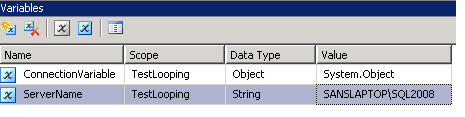
  6. Add 2 variables
  7.     a. Name: ConnectionVariable (A name of your choice)
            Scope: Package
            Type: Object
            Value: System.Object
        b. Name: ServerName  (A name of your choice)
            Scope: Package
            Type: String
            Value: A Valid Server Name

  8. Add an "Execute SQL Task" with SQL Statement like "select FullName from dba..tbl_ListOfServers".
  9. Set the result set to Full Result Set.
  10. On the Result Set page, Add a Result 
  11. Set Result Name "0" and assign it to your Object variable (In our case it is “ConnectionVariable”).
  12. Now add a “Foreach Loop Container” 
  13. Connect it from the “Execute SQL Task”
  14. Inside the “Foreach Loop Container” , add the required “Data Flow Task”
  15. Now Right-Click on the “Foreach Loop Container” and click on “Edit”
  16. Now Go to “Collection” page and Set “Enumerator” to “Foreach ADO Enumerator” and “Enumerator Configuration ” to the Object Variable(In Our Case “ConnectionVariable”) and Set “Enumeration Mode” to “Rows in the First Table”
  17. Now go to the “Variable Mapping” page and Choose the “String Variable” (In our case it is “ServerName”) and set the Index=0
  18. Now, in the “Data Flow Task” add a “OLE DB Source” (Dynamic Connection) and connect it down to a “OLE DB Destination” (which will be your Central Repository).
  19. Now Select the Source Connection Manager (In Our Case it is “Source”) and Right-Click on this Source and choose “Properties”.
  20. Expand the “Expressions” Option and click on the browse button (…)
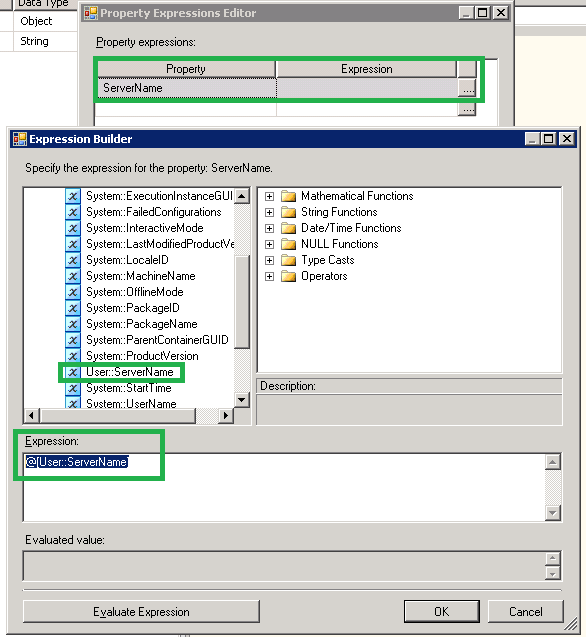
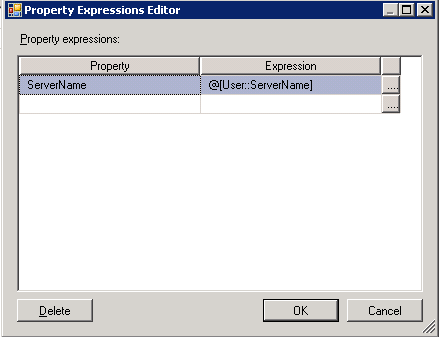
  21. Now in the “Property Expression Editor”, Choose the property “ServerName” and click on browse button (…). Now choose the String Variable (in our case “ServerName”) and Drag and Drop this variable into the “Expression” box and click “OK” and “OK”.


Now when the package runs, the “Execute SQL Task” will read the list of servers and stored in the table you specified and the “Foreach loop” will iterate over each record in that table, running the “Data Flow Task” each time while each time, the ServerName property of the Source Connection in the data flow will get a new value.

This article is also available in pdf format for downloading.
Please Click here to get your copy.

Thursday, April 7, 2011

T-SQL Query to find the SQL Server Protocols Status

Here is a T-SQL Query that I have developed to get the status of the SQL Server Protocols.
This query reads data from the registry.
DECLARE @InstanceName nvarchar(50)
DECLARE @value VARCHAR(100)
DECLARE @value_Out VARCHAR(100)
DECLARE @RegKey_InstanceName nvarchar(500)
DECLARE @RegKey nvarchar(500)

SET @InstanceName=CONVERT(nVARCHAR,isnull(SERVERPROPERTY('INSTANCENAME'),
'MSSQLSERVER'))

CREATE TABLE #SQLServerProtocols
(ProtocolName nvarchar(25),
Value nvarchar(10),
Data bit)

if(SELECT Convert(varchar(1),(SERVERPROPERTY('ProductVersion'))))<>8
BEGIN
SET @RegKey_InstanceName='SOFTWARE\Microsoft\Microsoft SQL Server\Instance Names\SQL'

EXECUTE xp_regread
  @rootkey = 'HKEY_LOCAL_MACHINE',
  @key = @RegKey_InstanceName,
  @value_name = @InstanceName,
  @value = @value OUTPUT

SET @RegKey='SOFTWARE\Microsoft\Microsoft SQL Server\'+@value+'\MSSQLServer\SuperSocketNetLib\Sm'
Insert into #SQLServerProtocols (Value,Data)
EXECUTE xp_regread
  @rootkey = 'HKEY_LOCAL_MACHINE',
  @key = @RegKey,
  @value_name = 'Enabled'
EXECUTE xp_regread
  @rootkey = 'HKEY_LOCAL_MACHINE',
  @key = @RegKey,
  @value_name = 'DisplayName',
  @value = @value_Out OUTPUT
UPDATE #SQLServerProtocols set ProtocolName=@value_Out 
where ProtocolName is null


SET @RegKey='SOFTWARE\Microsoft\Microsoft SQL Server\'+@value+'\MSSQLServer\SuperSocketNetLib\Np'
Insert into #SQLServerProtocols (Value,Data)
EXECUTE xp_regread
  @rootkey = 'HKEY_LOCAL_MACHINE',
  @key = @RegKey,
  @value_name = 'Enabled'
EXECUTE xp_regread
  @rootkey = 'HKEY_LOCAL_MACHINE',
  @key = @RegKey,
  @value_name = 'DisplayName',
  @value = @value_Out OUTPUT
UPDATE #SQLServerProtocols set ProtocolName=@value_Out
where ProtocolName is null

SET @RegKey='SOFTWARE\Microsoft\Microsoft SQL Server\'+@value+'\MSSQLServer\SuperSocketNetLib\TCP'
Insert into #SQLServerProtocols (Value,Data)
EXECUTE xp_regread
  @rootkey = 'HKEY_LOCAL_MACHINE',
  @key = @RegKey,
  @value_name = 'Enabled'
EXECUTE xp_regread
  @rootkey = 'HKEY_LOCAL_MACHINE',
  @key = @RegKey,
  @value_name = 'DisplayName',
  @value = @value_Out OUTPUT
UPDATE #SQLServerProtocols set ProtocolName=@value_Out 
where ProtocolName is null

SET @RegKey='SOFTWARE\Microsoft\Microsoft SQL Server\'+@value+'\MSSQLServer\SuperSocketNetLib\Via'
Insert into #SQLServerProtocols (Value,Data)
EXECUTE xp_regread
  @rootkey = 'HKEY_LOCAL_MACHINE',
  @key = @RegKey,
  @value_name = 'Enabled'
EXECUTE xp_regread
  @rootkey = 'HKEY_LOCAL_MACHINE',
  @key = @RegKey,
  @value_name = 'DisplayName',
  @value = @value_Out OUTPUT
UPDATE #SQLServerProtocols set ProtocolName=@value_Out 
where ProtocolName is null
END

SELECT ProtocolName, IsEnabled=CASE WHEN Data=1 THEN 'Enabled' 
ELSE 'Disabled' END FROM #SQLServerProtocols

DROP TABLE #SQLServerProtocols

Download this script from here.

Sunday, March 20, 2011

Automating SQL Server Express Backups

As we all know that many of the third party applications uses SQL Server Express Edition to store their backend data. And also these application will be used in Live environments which requires backing up of the databases to recover data during a disaster.
Since there is no SQL Server agent in Express Edition, we cannot schedule SQL Backups or any other DB Maintenance activities using SQL Scheduler. So for this purpose, we have to make use of the windows scheduler.
For Automating the backup process, i have developed the below query which can be used for multiple purpose and can be scheduled using windows scheduler as well as SQL Agent.

Script
:
IF  EXISTS (SELECT * FROM sys.objects WHERE object_id = OBJECT_ID(N'[dbo].[sp_BackupDatabases]') AND type in (N'P', N'PC'))
BEGIN
PRINT 'Stored Procedure "sp_BackupDatabases" already exists in the database. Dropping the SP to create a newer Version.'
DROP PROCEDURE [dbo].[sp_BackupDatabases]
END
GO

CREATE PROC sp_BackupDatabases (@BackupDBType nvarchar(10)='Help', @DBName nvarchar(max)=NULL, @BackupPath nvarchar(max)=NULL )
AS
/*
Author: Sandesh Segu
Website: http://www.SansSQL.com
*/
SET NOCOUNT ON

DECLARE @DateTime nvarchar(25)
SET @DateTime=LEFT(REPLACE(REPLACE(REPLACE(CONVERT(VARCHAR(30),GETDATE(),120),':',''),'-',''),' ',''),12)

IF @BackupDBType not in ('ALL','System','User','Specific','Help')
BEGIN
RAISERROR ('Incorrect Parameter Value Passed. @BackupDBType Parameters should be ''ALL'',''System'',''User'',''Specific''',16,1)
END

IF @BackupDBType<> 'HELP' and @BackupPath IS NULL
BEGIN
RAISERROR ('Specify the path to backup databases. @BackupPath must be specified',16,1)
END
IF (RIGHT(@BackupPath,1))<>'\'
BEGIN
Select @BackupPath=@BackupPath+'\'
END
ELSE
BEGIN
Select @BackupPath=@BackupPath
END

IF @BackupDBType='Help' AND @DBName IS NULL AND @BackupPath IS NULL
BEGIN
Print 'Usage of this Stored Proc can be in any of the below format.'
Print '-------------------------------------------------------------------------'
Print '1. To Backup All Databases in a instance'
Print '   Exec sp_BackupDatabases @BackupDBType = ''ALL'', @BackupPath = ''C:\Backup''' + Char(10)
Print '2. To Backup only System Databases in a instance'
Print '   Exec sp_BackupDatabases @BackupDBType = ''System'', @BackupPath = ''C:\Backup''' + Char(10)
Print '3. To Backup only User Databases in a instance'
Print '   Exec sp_BackupDatabases @BackupDBType = ''User'', @BackupPath = ''C:\Backup''' + Char(10)
Print '4. To Backup specific (One) Database(s) in a instance'
Print '   Exec sp_BackupDatabases @BackupDBType = ''Specific'', @DBName = ''AdventureWorks'', @BackupPath = ''C:\Backup''' + Char(10)
Print '5. To Backup specific (more than One) Database(s) in a instance'
Print '   Exec sp_BackupDatabases @BackupDBType = ''Specific'', @DBName = ''AdventureWorks,master,msdb'', @BackupPath = ''C:\Backup'''
Print '-------------------------------------------------------------------------'
END

IF exists (select * from sys.objects where name='BackupDatabases')
DROP TABLE BackupDatabases
CREATE TABLE BackupDatabases
(DBName nvarchar(100),
DatabaseID int,
[BackupStatement] nvarchar(max))

IF @BackupDBType='ALL' AND @DBName IS NULL AND @BackupPath IS NOT NULL
BEGIN
INSERT INTO BackupDatabases
SELECT name,database_id, '' FROM sys.databases WHERE name <>'tempdb'
END

IF @BackupDBType='System' AND @DBName IS NULL AND @BackupPath IS NOT NULL
BEGIN
INSERT INTO BackupDatabases
SELECT name,database_id, '' FROM sys.databases WHERE name in ('master', 'model','msdb')
END

IF @BackupDBType='User' AND @DBName IS NULL AND @BackupPath IS NOT NULL
BEGIN
INSERT INTO BackupDatabases
SELECT name,database_id, '' FROM sys.databases WHERE database_id>4
END

IF @BackupDBType='Specific' AND @DBName IS NULL
BEGIN
RAISERROR ('Specify the Database Name(s) to Backup. @DBName must be specified.',16,1)
END

IF @BackupDBType='Specific' AND @DBName IS NOT NULL AND @BackupPath IS NOT NULL
BEGIN
DECLARE @DelimiterPos int
-- Find the first comma
SET @DelimiterPos = PATINDEX( '%,%', @DBName)
-- If a delimiter was found, @DelimiterPos will be > 0.
WHILE @DelimiterPos > 0
BEGIN
-- Insert the value between the start of the string and the first delimiter, into the table variable.
INSERT INTO BackupDatabases
SELECT name,database_id, '' FROM sys.databases WHERE name in (SELECT CAST(LTRIM(RTRIM((SUBSTRING(@DBName, 1, @DelimiterPos -1)))) AS nvarchar      ))                  
-- Trim the string of the first value and delimiter.
SET @DBName = SUBSTRING(@DBName, @DelimiterPos +1, LEN(@DBName) - @DelimiterPos)
                       
-- Look for the next delimiter in the string.
SET @DelimiterPos = PATINDEX( '%,%', @DBName)
END
INSERT INTO BackupDatabases
SELECT name,database_id, '' FROM sys.databases WHERE name in (SELECT CAST(LTRIM(RTRIM((@DBName))) AS nvarchar))
END

UPDATE BackupDatabases SET BackupStatement= 'Print ''Backup of Database '+DBName+' Started''; Backup Database ['+DBName+'] TO DISK='''+@BackupPath+DBName+'_Backup_'+@DateTime+'.bak'' WITH INIT, STATS=10'
Print 'The Requested database(s) are being backed up to the location "'+@BackupPath+'"'
WHILE (Select COUNT(*) from BackupDatabases)>0
BEGIN
DECLARE @BackupStatement nvarchar(max)
SELECT @BackupStatement= [BackupStatement] FROM BackupDatabases
Exec sp_executesql @BackupStatement
Delete from BackupDatabases where [BackupStatement]=@BackupStatement
END
DROP TABLE BackupDatabases

SET NOCOUNT OFF
GO

Usage:
Usage of this Stored Proc can be in any of the below format.
-------------------------------------------------------------------------
1. To Backup All Databases in a instance
   Exec sp_BackupDatabases @BackupDBType = 'ALL', @BackupPath = 'C:\Backup'

2. To Backup only System Databases in a instance
   Exec sp_BackupDatabases @BackupDBType = 'System', @BackupPath = 'C:\Backup'

3. To Backup only User Databases in a instance
   Exec sp_BackupDatabases @BackupDBType = 'User', @BackupPath = 'C:\Backup'

4. To Backup specific (One) Database(s) in a instance
   Exec sp_BackupDatabases @BackupDBType = 'Specific', @DBName = 'AdventureWorks', @BackupPath = 'C:\Backup'

5. To Backup specific (more than One) Database(s) in a instance
   Exec sp_BackupDatabases @BackupDBType = 'Specific', @DBName = 'AdventureWorks,master,msdb', @BackupPath = 'C:\Backup'

To Delete the old backups I use the below query.
DECLARE @TwoDaysOld VARCHAR(50)
Set @TwoDaysOld=CAST(DATEADD(d, -2, GETDATE()) AS VARCHAR)
Select @TwoDaysOld
Exec master.dbo.xp_delete_file 0,N'C:\Backups\',N'bak',@TwoDaysOld
This will delete any .bak files in the given location which are older than 2 days.

So after creating the sp_BackupDatabases stored proc, if we want to schedule the backups using windows scheduler than we have create a batch file (.bat file) which will be called in the windows scheduler at the scheduled time.
sqlcmd -S(local)\SQLEXPRESS -E -Q"DECLARE @TwoDaysOld VARCHAR(50) Set @TwoDaysOld=CAST(DATEADD(d, -2, GETDATE()) AS VARCHAR)
Exec master.dbo.sp_BackupDatabases @BackupDBType = 'User', @BackupPath = 'C:\Backup'
Exec master.dbo.xp_delete_file 0,N'D:\Backups\',N'bak',@TwoDaysOld"

Scripts can be downloaded from the below locations

Sunday, March 13, 2011

T-SQL Query to find the date when was DBCC CHECKDB Last run

As a Database Administrator, we know the importance of DBCC CHECKDB and will run this command to check the logical and physical integrity of all objects in the specified database.
When DBCC CHECKDB is run on a database, it does the following actions
  • Runs DBCC CHECKALLOC on the database
  • Runs DBCC CHECKTABLE on every table and view in the database
  • Runs DBCC CHECKCATALOG on the database
  • Validates the contents of every indexed view in the database
  • Validates Service Broker data in the database
Before you start the DBCC CHECKDB on a database you might want to know the date and time when this command was lust run by you or someone else from your team.
Prior to SQL Server 2005, this data was not getting logged in the system. But in SQL Server 2005 onwards this data is getting logged in the system and using the below script you can find the date and time when DBCC CHECKDB was last run on a database.
CREATE TABLE #DBInfo (
       Id INT IDENTITY(1,1),
       ParentObject VARCHAR(255),
       [Object] VARCHAR(255),
       Field VARCHAR(255),
       [Value] VARCHAR(255)
)

CREATE TABLE #Value(
DatabaseName VARCHAR(255),
LastDBCCCHeckDB_RunDate VARCHAR(255)
)

EXECUTE SP_MSFOREACHDB'INSERT INTO #DBInfo Execute (''DBCC DBINFO ( ''''?'''') WITH TABLERESULTS'');
INSERT INTO #Value (DatabaseName) SELECT [Value] FROM #DBInfo WHERE Field IN (''dbi_dbname'');
UPDATE #Value SET LastDBCCCHeckDB_RunDate=(SELECT TOP 1 [Value] FROM #DBInfo WHERE Field IN (''dbi_dbccLastKnownGood'')) where LastDBCCCHeckDB_RunDate is NULL;
TRUNCATE TABLE #DBInfo';

SELECT * FROM #Value

DROP TABLE #DBInfo
DROP TABLE #Value

The Script can be downloaded from here.

Ads