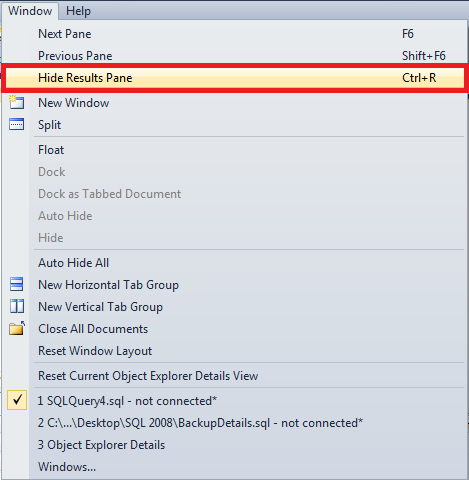
Recently I installed Denali CTP 3 version and was writing a code which is coming next in this blog. During that time I attempted to hide the results pane using the keyboard shortcut Ctrl+R and was surprised that the keyboard shortcut Ctrl+R was not working.
When I investigated further I found that that the keyboard shortcut was not assigned to the command "Hide Results Pane".
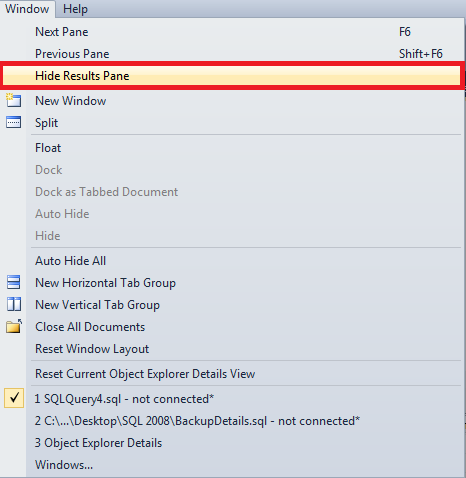
To fix this issue or to assign the keyboard shortcut to the command "Hide Results Pane", follow the below steps.
- In a SSMS window, go to "Tools" menu and choose "Options".
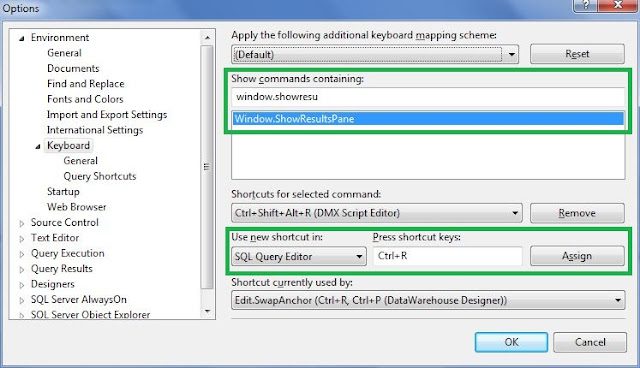
- In the left pane of "Options" window, expand "Environment" and then click on "Keyboard".
- In the right pane, Search for the command "Window.ShowResultsPane" Under "Show Commands Containing:" section and select that command
- Now, Under "Shortcuts for selected command:" section choose "SQL Query Editor" from the dropdown list of "Use new shortcut in:" sub-section.
- In the "Press shortcut keys:" sub-section place the cursor and press the keys "Ctrl" followed by "R"
- Click on "Assign" button and click "OK" to exit the "Options" menu and start using the keyboard shortcut "Ctrl+R" to Hide\Show Results Pane.