


There will be many different messages that will be logged in the Error Log of SQL Server. Among them you might also find the below message some times.
This is the most common message that will be logged when there is no "Mail Session" defined for the SQL Server Agent Alert System.
| Date 6/1/2011 8:18:27 AM Log SQL Server Agent (Archive #2 - 6/1/2011 8:18:00 AM) Message [098] SQLServerAgent terminated (normally) |
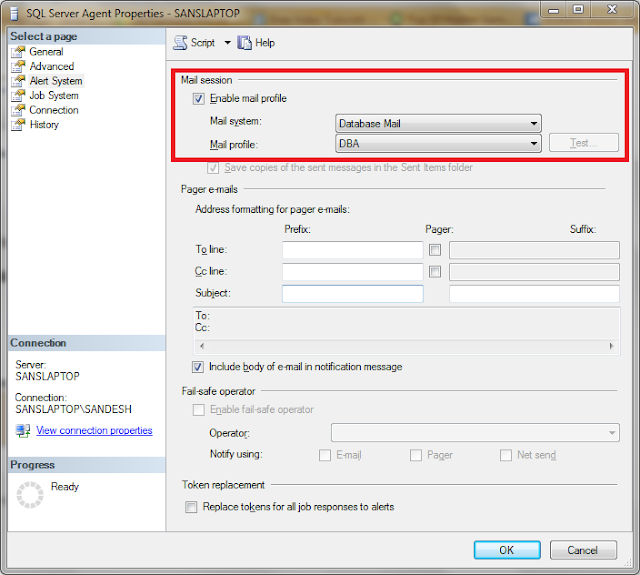
To Fix this or to make this message disappear in the Error Log, you have to enable "Mail Session" and re-start the SQL Server Agent.
To Do this,
- Connect to the Server
- Right Click on the "SQL Server Agent" and go to "Properties"
- Then Go to "Alert System" Tab
- Make sure the check box "Enable Mail Profile" is checked
- Click OK to exit
- Re-start the SQL Server Agent Service
Now if you again look into the Error Log you will not find this message anymore after re-starting the Agent Service.
3 comments:
Thanks; this was useful
Thank you, that little thing helped me a lot.
A clear and practical troubleshooting guide for SQL Server users. The step-by-step instructions make it easy to identify and resolve the mail profile issue, saving time for database administrators. Sharing helpful technical content like this is a great way to educate and engage audiences through social media marketing.
Post a Comment