SansSQL

Sunday, March 13, 2011

T-SQL Query to find list of Instances Installed on a machine

Here is a T-SQL Query to find the list of instances Installed on a machine.

DECLARE @GetInstances TABLE
( Value nvarchar(100),
 InstanceNames nvarchar(100),
 Data nvarchar(100))

Insert into @GetInstances
EXECUTE xp_regread
  @rootkey = 'HKEY_LOCAL_MACHINE',
  @key = 'SOFTWARE\Microsoft\Microsoft SQL Server',
  @value_name = 'InstalledInstances'
 
Select InstanceNames from @GetInstances

OR

Create Table #GetInstances
( Value nvarchar(100),
 InstanceNames nvarchar(100),
 Data nvarchar(100))

Insert into #GetInstances
EXECUTE xp_regread
  @rootkey = 'HKEY_LOCAL_MACHINE',
  @key = 'SOFTWARE\Microsoft\Microsoft SQL Server',
  @value_name = 'InstalledInstances'
 
Select InstanceNames from #GetInstances

drop table #GetInstances

Both the queries are almost similar, except for that first query uses a table variable and the second one uses temporary table.
T-SQL Query to find the date when was DBCC CHECKDB Last run

As a Database Administrator, we know the importance of DBCC CHECKDB and will run this command to check the logical and physical integrity of all objects in the specified database.
When DBCC CHECKDB is run on a database, it does the following actions
  • Runs DBCC CHECKALLOC on the database
  • Runs DBCC CHECKTABLE on every table and view in the database
  • Runs DBCC CHECKCATALOG on the database
  • Validates the contents of every indexed view in the database
  • Validates Service Broker data in the database
Before you start the DBCC CHECKDB on a database you might want to know the date and time when this command was lust run by you or someone else from your team.
Prior to SQL Server 2005, this data was not getting logged in the system. But in SQL Server 2005 onwards this data is getting logged in the system and using the below script you can find the date and time when DBCC CHECKDB was last run on a database.
CREATE TABLE #DBInfo (
       Id INT IDENTITY(1,1),
       ParentObject VARCHAR(255),
       [Object] VARCHAR(255),
       Field VARCHAR(255),
       [Value] VARCHAR(255)
)

CREATE TABLE #Value(
DatabaseName VARCHAR(255),
LastDBCCCHeckDB_RunDate VARCHAR(255)
)

EXECUTE SP_MSFOREACHDB'INSERT INTO #DBInfo Execute (''DBCC DBINFO ( ''''?'''') WITH TABLERESULTS'');
INSERT INTO #Value (DatabaseName) SELECT [Value] FROM #DBInfo WHERE Field IN (''dbi_dbname'');
UPDATE #Value SET LastDBCCCHeckDB_RunDate=(SELECT TOP 1 [Value] FROM #DBInfo WHERE Field IN (''dbi_dbccLastKnownGood'')) where LastDBCCCHeckDB_RunDate is NULL;
TRUNCATE TABLE #DBInfo';

SELECT * FROM #Value

DROP TABLE #DBInfo
DROP TABLE #Value

The Script can be downloaded from here.

Sunday, February 27, 2011

ERROR - Cannot set a credential for principal 'sa'

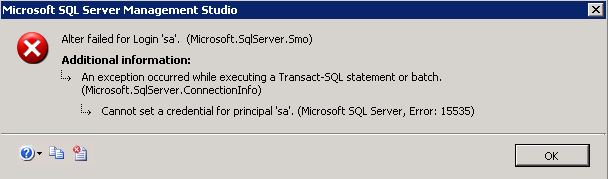
You may sometimes receive an error which says "Cannot set a credential for principal 'sa'" while you are trying to alter the login 'sa' in SQL Server 2005 or SQL Server 2008.


This happens because, the SQL Server tries to drop any credential that is mapped to your login credentials while altering and because your credential cannot be set to "sa" login, you will receive this error.
FIX:
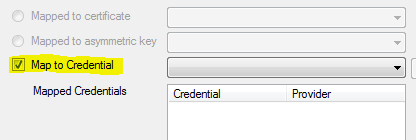
Fix for this error is very simple. Just make sure that the option "Map to Credential" is checked in the "General" tab of the Login Properties Page.


Referencehttp://support.microsoft.com/kb/956177

Tuesday, February 22, 2011

SQL Server 2011 (Denali) - First Look

First look of SQL Server Denali after Installation.

Splash Screen


Login Window


SQL Server Management Studio

SQL Server 2011 (Denali) - Installation

The Installation process of SQL Server Denali is similar to the installation of SQL Server 2008 with little bit of modification to accommodate the new features installation.


Ads