SansSQL

Sunday, February 27, 2011

ERROR - Cannot set a credential for principal 'sa'

You may sometimes receive an error which says "Cannot set a credential for principal 'sa'" while you are trying to alter the login 'sa' in SQL Server 2005 or SQL Server 2008.
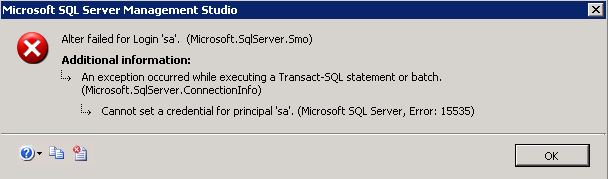

This happens because, the SQL Server tries to drop any credential that is mapped to your login credentials while altering and because your credential cannot be set to "sa" login, you will receive this error.
FIX:
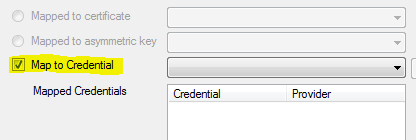
Fix for this error is very simple. Just make sure that the option "Map to Credential" is checked in the "General" tab of the Login Properties Page.

Referencehttp://support.microsoft.com/kb/956177

Tuesday, February 22, 2011

SQL Server 2011 (Denali) - First Look

First look of SQL Server Denali after Installation.

Splash Screen


Login Window


SQL Server Management Studio

SQL Server 2011 (Denali) - Installation

The Installation process of SQL Server Denali is similar to the installation of SQL Server 2008 with little bit of modification to accommodate the new features installation.


Surface Area Configuration in SQL Server 2008

When I ask the question, what is the difference between SQL Server 2005 and SQL server 2008, one of the differences told by many people is that the Surface Area Configuration has been removed in SQL Server 2008.
But in reality the options that were managed using the Surface Area Configuration tool in SQL Server 2005 are now being managed using Facets in Policy Based Management in SQL Server 2008 onwards.

Facet in general means “a predefined set of properties that can be managed

To access the Surface Area Configuration in SQL server 2008 onwards, follow the steps below.
  1.  Right Click on the Server and choose "Facets"


  2. In the resulting page, choose the facet “Surface Area Configuration” to manage the its properties


Sunday, February 20, 2011

T-SQL Queries to find SQL Server Cluster Nodes and Shared Drives

In one of my earlier post's "Finding Cluster Nodes or Cluster Name" , I had told about the query which can be used to find the name of the node on which the SQL Server Instance is currently running.
Here are more such SQL Server cluster related T-SQL queries which helps in finding SQL Server Cluster Nodes and their shared drives.
  1. Find name of the Node on which SQL Server Instance is Currently running
    SELECT SERVERPROPERTY('ComputerNamePhysicalNetBIOS') AS [CurrentNodeName] 
    If the server is not cluster, then the above query returns the Host Name of the Server.

  2. Find SQL Server Cluster Nodes
    a. Using Function
    SELECT * FROM fn_virtualservernodes() 

    b. Using DMV
    SELECT * FROM sys.dm_os_cluster_nodes 

  3. Find SQL Server Cluster Shared Drives
    a. Using Function
    SELECT * FROM fn_servershareddrives() 

    b. Using DMV
    SELECT * FROM sys.dm_io_cluster_shared_drives

Ads